Monday, December 10, 2012

20% Project: Final Product
.JPG)
Why Google Hangout is Superior to Blackboard Collaborate

So initially I was very excited to use Blackboard Collaborate for our Education and Technology last week on Monday. I quickly found myself to be frustrated with the video and audio limitations we had. For some reason, we could only have 3 people using audio/webcams at once (our colleague Maureen figured out). Since our class relies heavily upon discussion, I found this limitation to be frustrating. Although I do admit my bias and preference for Google Hangout. The features on Google Hangout for many people to use their audio and webcams at once, and the way the main screen enlarges to demonstrate who is currently talking, gives the discussion a very natural feel. That being said, one of the pros of Blackboard Collaborate was the chat option that allowed for us to chat and not disrupt the presenter, it reminded me of Backchannel. The screen on the right shows that Blackboard collaborate allowed us to all write, paint, or add images. I think that is a great option for working together on a project. Overall, I think that Google Hangout is the better option for discussion based courses. On the other hand, I believe that Blackboard Collaborate is a great option for teacher-centered lecture styles online and for collaboration on projects.
Monday, December 3, 2012
iPads in the Elementary Dual-Immersion Classroom

Our class was privileged to be able to observe Paul Ecke Central Elementary School in Encinitas Union School District on November 28th. It was a nice surprise upon arriving, that we realized it was a Dual-Immersion (Spanish) school. We learned about many iPads and apps that the school had bought for the school and their use in the classroom. I can't quite remember any of them at this exact moment because there were so many! But one I remember was like a series of short free books that students had to access to.***The teacher then could integrate discussion questions directly into the appropriate spots in the text. Then the students could answer the questions and the students were able to see their peers' responses. In that same app some words in the text were linked to maps and other images for the students. I think that's a great app for specifically say ELL learners, because if they are reading something and they don't know what it is, they could immediately perhaps see a link to an image or map that could help their comprehension.
In an article entitled, "5 Critical Mistakes Schools Make with iPads (And How to Correct Them)" by Tom on Edudemic I saw how the elementary school in Encinitas was successful in avoiding the 5 mistakes (from what I observed during a day visit). The first mistake described is too much of a focus on content apps. It was clear that the teachers used the integrated apps and capabilities of the iPad for all content. Students used the moviemaker to create movies with images and their voice to explain say how a volcano erupts. What I learned from this was that it can give students an opportunity to teach their peers. Another mistake is that schools don't offer enough professional development to go along with the iPad integration in the classroom. Teachers in the classroom were honest that initially it was a bit time consuming to learn the apps but that it was worth it. The school seems to have a lot of support in the professional development of the teachers. The third mistake is that schools tend to what the iPad to be a laptop. The teachers at this school discussed how they worked with the iPad but that they would still sometimes take their class to the computer lab for bigger projects. The computer lab, by the way was filled with Apple computers! The fourth mistake is that the iPads in schools sometimes have multi-users. In most classrooms we entered, the iPad was in the sole ownership of an individual student. The fifth mistake is that the administration fails to communicate why the iPads were bought. At this school the only issue that seems to have arised is that students can't take the iPads home on the weekends or during long holiday breaks. I found this to be interesting, because I know of other school districts, such as Sweetwater Union High School District that does allow students to take their iPads home on weekends and holidays.
***Thanks to my colleague Maureen she reminded me that the name of the app is Subtext.
IF IPADS ARE THE ANSWER, WHAT IS THE QUESTION?

Photo Credit: Andrew Wiese
This is the question that was posed by my Professor Jeff Heil. In the case of the elementary dual-immersion classroom, I am convinced that iPads are a good answer. Yet, I am left pondering what the question is. A question that I think may fit this situation is the following: What technology can best serve the learning of the students in the dual-immersion classroom? The iPads best serve the students, because the school decided to give each student an iPad, which they can take home Monday-Friday for homework. In this way, the iPad can serve the individual learning styles and needs of each student. Whether the student is a kinesthetic, visual, and/or audio; the iPad has apps and capabilities that serve each learning style combination. Furthermore, the iPad has apps that allow the students to be creative and academic by drawing pictures and making presentations with their own voice lectures/explanations. In this case, the student can be turned into the teacher, and therefore is empowered to tutor and explain to his/her peers. This doesn't even cover the slew of educational apps that are available for the students.
Saturday, December 1, 2012
Monday, November 26, 2012
Making History Come Alive: Abraham Lincoln
Movie: Lincoln (2012)

Disneyland: Great Moments with Mr. Lincoln Show
Another great way to make history come alive, or more specifically, to make Abraham Lincoln come alive, is by visiting Disneyland! Yes, you read that correctly. On your next visit to Disneyland, I suggest a visit to the Opera House on Main Street that has the performance entitled "Great Moments with Mr. Lincoln." Inside you find many historical artifacts from the creation of Disneyland, and then at the appropriate time you are ushered into a theater where you watch an Animatronics show of Lincoln. I really remember enjoying this show because of the authentic primary documents in the show ranging from Civil War photos to songs. Alas, if you can't go to Disneyland, there is a Youtube video of the entire show!
Making Historical Trading Cards
Just today I found out about an Apple app designed for iPad that allows anyone to create their own historical trading cards! It is designed by International Reading Association and seems to have great reviews from educators. This seems like a great way for students to make historical people and events their own, and perhaps help history come alive for them! The only limitation I see as of now, is that it is only compatible with the iPad. I did a Google search for a similar app but on the web, and was not able to find anything.
Having Class through Google Hangout

Last week our EDUC 578 USD class had class on Google hangout. It was the first time I ever experienced using Google hangout for a class. Overall I must say I enjoyed the experience. Most of my colleagues were able to get on without any issues, unfortunately a couple did struggle with some tech issues that prevented them from getting into our Google hangout. I liked the flexibility of not necessarily having to be home in San Diego to still actively participate in this class meeting. It was my boyfriend's birthday on the Monday that we scheduled for our Google hangout, so fortunately I was able to celebrate it with him in Orange County. Another con (besides some technical issues), was that we were all experiencing some feedback. I think that perhaps this problem could have been remedied by all of us using headphones, to prevent our mics from simultaneously picking up our voices and the sound from our speakers.
I liked that I could see the video for all of my colleagues on smaller screens at the bottom, with one large screen focused on who was doing most of the talking. The screen-sharing option through the Google hangout was amazing, one of my colleagues named Jeff shared his updates with a visual screenshare of what he was referencing It made it easier for me to understand what he was discussing. I also really liked the group chat that was available during the Google hangout, so when some of my colleagues needed to leave a little early, they simply explained themselves through the chat, without disrupting the person who was presenting. It made me think of a "Backchannel" that is sometimes used during presentations at conferences. Lastly, although I was not physically in the same room as my colleagues, I felt privileged to be able to have a glance into their personal lives. In the background for my colleagues I could see their homes, significant others, children, and pets. It somehow helped me connect better to my colleagues to see this side of them, that I don't necessarily see in the physical classroom at USD. Check out my video with the time lapse app on the pros and cons summary!
Monday, November 19, 2012
Zumba Fitness & Multiple Intelligences
MULTIPLE INTELLIGENCES
Howard Gardner's theory of multiple intelligences has surfaced in my masters/credential program at USD in various courses and contexts. Basically Gardner developed a theory that people are strongly suited with one or more of nine intelligences: linguistic, logical/mathematical, musical/rhythmic, bodily/kinesthetic, spatial, intrapersonal, interpersonal, existential. To learn more about the theory of multiple intelligences and its' application to the classroom see the PBS site. Also, if you are not sure which intelligences are your strongest, then take this free online 40 question quiz. I took the quiz and it took me no longer than 5-7 minutes, and at the end it gives you a great graphic with your results. Here is mine:
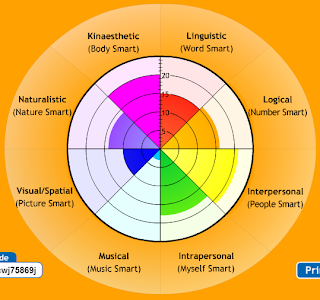
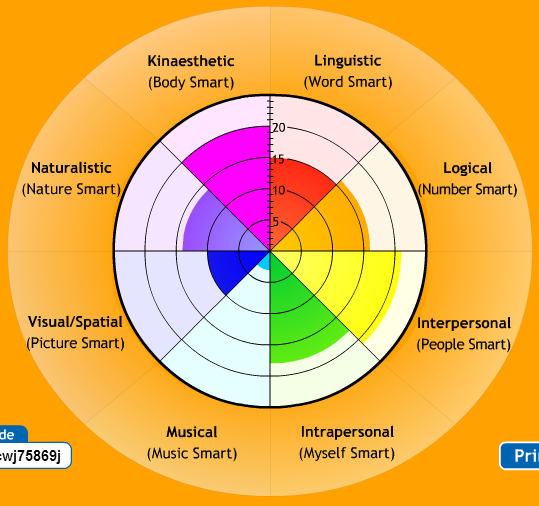
From my results, it can be seen the my strengths lie in the following intelligences: kinesthetic, interpersonal, logical, ans intrapersonal. These intelligences are the kind that are best suited for high academic performance in the traditional classroom. School has always been something that I really enjoyed and excelled at. In the classroom I know that I must prepare lesson plans that will attempt to give more students a chance to tap into their specific strengths. Yet, I acknowledge that every lesson may not fully achieve this, I do hope the awareness will help me in lesson planning.
ZUMBA
For the past two weeks I have been taking a Zumba Fitness Dance Class, for one hour, once a week. For those who are unfamiliar with Zumba, it is a latin-fused mixture of music and dance with quick moves designed to work out your body. See the youtube video below for a look at what a Zumba class looks like:
As it can be seen from the results of my multiple intelligence quiz, my visual/spatial and musical intelligence is my weakest of intelligences. This is something that I have been aware of, but it was even more apparent in the Zumba class. I enjoy dancing as I please when I have the opportunity, but this was the first time since my quinceñera that I had to follow dance moves. Not only did I have to follow dance moves, but I had to pick it up quickly, because the moves are not slowed down or broken down. The result was me trying my best to follow the intrsutctor's moves. I found it to be very frustrating that no matter how hard I tried, or how much I focused, all my hard-work wasn't getting me the results I thought I deserved. I just was not able to perform at the level that I thought I should, considering how hard I was trying. This experience made me think about the element of "empathy" that Daniel Pink discusses in his book A Whole New Mind. After the Zumba experience, I started to think of students that are my opposite in regards to intelligences. All those students who are strongest in the spatial and musical intellgences, might be more prone to struggle in the traditional academic classroom. Sometimes, no matter how hard they work they might not achieve the results they think they deserve. The Zumba experience, also made me think about if the moves were slowed down, or chunked, then I think I could learn them. This experience made me see the importance of "chunking" material for students in a whole new light.
Friday, November 16, 2012
20% Project Update: Screencasting
I have a powerpoint that I would like to easily convert into a presentation on youtube with my audio lecture recorded. I have investigated some of the screencasting options that were suggested to me by my professor, and I also have researched some on my own. Here are my findings:
Screencasting Research
Screenr and Jing allow you to record for up to five minutes and seem to be very user-friendly.
I didn't like the five minute time constraint, because my powerpoint presentations usually take a little closer to ten minutes for various historical topics. Therefore, I decided to go with Camtasia which is Jing's "older sibling" according to the company website. What I liked about Camtasia is that they offer you a free 30 day trial, and to get it all you have to do is give your e-mail. Some other screencasting options offered free trials, but they involved giving them your credit card number, which I didn't want to do.

Camtasia Tutorials
I received an e-mail from Camtasia that gave me the direct link to the tutorial videos for Camtasia. I watched the first four videos which each averaged about 2 minutes. The first 4 videos are the basics of Camtasia, preparing to record, the actual recording, and the editing options. I also watched the tutorial videos on "smart focus to zoom and pan" and "callouts." The zooming option is similar to what happens on Prezi, but since I am doing a powerpoint, I don't really anticipate using it. What I was excited to discover was the addition of "callouts" which in essence are arrows that can focus on certain aspects of your presentation. I do anticipate using that during my powerpoint lecture. I also watched the "sharing" tutorial which discusses how to share the video through screencast.com, but it shows that one of the options is to share through youtube. I imagine that steps would be similar, so I am excited to see that it seems easy to share the video on youtube once I am done.

Screencasting Research
Screenr and Jing allow you to record for up to five minutes and seem to be very user-friendly.
I didn't like the five minute time constraint, because my powerpoint presentations usually take a little closer to ten minutes for various historical topics. Therefore, I decided to go with Camtasia which is Jing's "older sibling" according to the company website. What I liked about Camtasia is that they offer you a free 30 day trial, and to get it all you have to do is give your e-mail. Some other screencasting options offered free trials, but they involved giving them your credit card number, which I didn't want to do.

Camtasia Tutorials
I received an e-mail from Camtasia that gave me the direct link to the tutorial videos for Camtasia. I watched the first four videos which each averaged about 2 minutes. The first 4 videos are the basics of Camtasia, preparing to record, the actual recording, and the editing options. I also watched the tutorial videos on "smart focus to zoom and pan" and "callouts." The zooming option is similar to what happens on Prezi, but since I am doing a powerpoint, I don't really anticipate using it. What I was excited to discover was the addition of "callouts" which in essence are arrows that can focus on certain aspects of your presentation. I do anticipate using that during my powerpoint lecture. I also watched the "sharing" tutorial which discusses how to share the video through screencast.com, but it shows that one of the options is to share through youtube. I imagine that steps would be similar, so I am excited to see that it seems easy to share the video on youtube once I am done.

Sunday, November 11, 2012
Game-Based Learning & the Classroom
Recently, I have learned a little about Game-Based Learning and how it can be implemented in the classroom. An article from the Huffington Post provided an excellent introduction to the theory of GBL and the positive impact it can have in the classroom. Basically GBL is the idea of how games can be used for the purpose of teaching and learning, and therefore how the use of games in the classroom can be beneficial to students and teachers alike. There is no doubt in my mind about the wonderful impact games can have in the classroom, I have witnessed the level of engagement, competition, collaboration, and focus of students during a jeopardy game review lesson that I gave.
This semester I have been volunteering the the kindergarten classroom of my nephew about twice a week for a couple of hours. Most of the time, I help with one of the groups, and each group session begins with a review of several index cards. One set of cards has the sight words that the students are working on, and another set has the letters on it. The letter index cards usually fly by, the students say the letter and then the sound the letter makes. But by the time I get to the sight words, most of the students are zoning out. After reading GBL article, I decided that I would consider how I could make the students in the group say the sight words, into a type of game. Without explaining any special instructions, I began showing the group the sight words, one at a time. Then, whoever the first student to read the sight word was, I would proceed to give that student the index card. Soon enough, the entire group was completely engaged because it had become a "game" without me explaining it was a game, or saying any special rules. The students were actively trying to sound-out and read the sight words. I then more or less gave out an even amount of index cards to all the students to keep them from becoming too competitive with one another. I didn't want to single-out one student simply because they took a second longer to read the word. Yet, I found this method to have been very successful. Even when I continued to play this "game" on different days with the same group, the game format kept them 100% more engaged than the traditional index card reading.
This semester I have been volunteering the the kindergarten classroom of my nephew about twice a week for a couple of hours. Most of the time, I help with one of the groups, and each group session begins with a review of several index cards. One set of cards has the sight words that the students are working on, and another set has the letters on it. The letter index cards usually fly by, the students say the letter and then the sound the letter makes. But by the time I get to the sight words, most of the students are zoning out. After reading GBL article, I decided that I would consider how I could make the students in the group say the sight words, into a type of game. Without explaining any special instructions, I began showing the group the sight words, one at a time. Then, whoever the first student to read the sight word was, I would proceed to give that student the index card. Soon enough, the entire group was completely engaged because it had become a "game" without me explaining it was a game, or saying any special rules. The students were actively trying to sound-out and read the sight words. I then more or less gave out an even amount of index cards to all the students to keep them from becoming too competitive with one another. I didn't want to single-out one student simply because they took a second longer to read the word. Yet, I found this method to have been very successful. Even when I continued to play this "game" on different days with the same group, the game format kept them 100% more engaged than the traditional index card reading.
Mexican Chicken Enchiladas (Lasagna/Casserole Style)
My sister introduced me to a way that enchiladas can be made for a family, in an easier and faster way than individual enchiladas. Basically the enchiladas are made in a lasagna pan, much like a lasagna would be made, in layers that is. I buy most of the ingredients usually from Northgate Gonzalez Market, it's a supermarket chain that carries a lot of Latino products. But I have found that most super markets like: Albertsons, Vons, etc. carry the ingredients needed. This was one of the first things I learned how to cook for myself when I was doing my undergraduate work. As a novice in the kitchen, I think that this recipe was fairly easy to follow. The great thing, is that I always had left overs, that I could just heat up in the microwave later! This dish tastes great with a side of Mexican rice. Perhaps some other time I will add the family recipe for the Mexican rice!
INGREDIENTS:
- 30 count of corn tortillas (I like using the Guerrero brand)
- 1 red enchilada sauce can [28 ounces] (El Pato is the best one, La Victoria is the runner up, and Las Palmas is okay).
- 16-24 ounces of shredded Mexican Cheese Blend (usually this is a mixture of cheddar and Monterrey jack cheeses, but feel free to choose any shredded cheese you prefer).
- Skineless and Boneless Chicken Breasts
- Garlic Salt Seasoning
- Optional: Sour Cream
- Optional: Chopped Black Olives
- Optional: Salt
DIRECTIONS:
- Add water to a large pot, fill it about 3/4 of the way (You want to make sure you can add the chicken to it later and that it will fit in the pot, without the pout over-filling). Add a little bit of salt to the water, so that it will boil faster.
- Once the water has started to boil (you see bubbles rising), add the chicken into the pot. Let the chicken completely cook (this will take about 15-20 minutes). Check to see if the chicken is fully cooked by cutting it open, and seeing that the chicken is no longer pink inside. Then turn off the flame, and take the chicken out of the pot. I recommend letting the chicken cool on a cutting board.
- Once the chicken is cooled, use your hands or a knife and shred the chicken. Then sprinkle on the garlic salt seasoning onto the chicken. Put the chicken in a bowl.
- Preheat the oven to 350 degrees.
- Now get your casserole/lasagna pan and set it on the counter.
- Use a can opener to open the can of enchilada sauce. Then pour the sauce into a bowl.
- Pour a little but of the sauce into the casserole/lasagna pan so that it creates a thin layer of sauce at the bottom of the pan.
- Now take a tortilla and dip it completely in the sauce, and then put flat in the lasagna pan. Keep doing this until you have one layer of tortillas covering the bottom of the pan. This usually takes about 6 tortillas. It is okay for the tortillas to overlap each other a little bit.
- Now place a layer of the shredded chicken on top of the tortillas.
- Now place a player of the shredded Mexican cheese on top of the chicken.
- Now you will take the tortillas and dip them in the sauce, and create a new layer.
- Repeat steps #8-11 until you reach the top of the lasagna pan. It usually takes me about 3 layers of tortillas/chicken/cheese to reach the top.
- At the top of the last tortilla layer, only put cheese.
- Now put the lasagna pan in the oven, and let it bake for about 20-25 mins. The Mexican enchiladas will be ready when all the cheese has melted!
- You can have each person cut a slice and then if you would like, they can add a scoop of sour cream on top, and olives on top of that!
Monday, November 5, 2012
Griffith Observatory in Los Angeles
This weekend I had the pleasure of visiting Griffith Observatory for the first time! I went on the Saturday with my boyfriend Andrew, and some friends. Since it was Saturday, the parking situation was a little crazy. We had planned to go on a hike near the observatory, since we had heard there were trails; but instead we opted for parking down the hill (the only place parking was available at that point in time) and then "hiking" up to the observatory. Once we did get to the top, it was a pretty awesome view of Los Angeles (minus the smog) and of the Hollywood sign!
.JPG)
Inside the observatory, which I was surprised to find out included a free entrance, were a series of displays, and a lot of them had fun hands-on learning components to them. One of my favorite displays, was the one about the role of the gravitational pull of the sun and the moon on the tides. I learned that in Nova Scotia the tide can rise and go with a difference of up to 50 feet! There was an awesome animation showing how literally a boat that would be docked in the sea, could all of a sudden be found at the bottom of the shore, due to the tides. We also stumbled upon an awesome photo backdrop inside the observatory, and I couldn't resist taking a picture.
.JPG)
.JPG)
In the evening we bought tickets for a show entitled "Time's Up" in one of the theaters. I was surprised that the ticket only cost $5 for students and $7 for an adult, I think the price was relatively cheap for the high-quality of the viewing in the theater. The theater was set-up kind of like an IMAX where the screen is above you and you might experience a bit of motion-sickness. I enjoyed the show because it was an amazing mixture of scientific facts with history from the times of the Mayan Civilization to the present day. I really liked how there was a discussion of what the Mayan Calendar really is, and how it doesn't predict the end of the world to be this coming December.
.JPG)
We bought our tickets promptly at 6:00 pm, because they only the sell the tickets for certain show times are tiered time slots. After we secured our tickets, we stepped outside and experienced another beautiful view of Los Angeles from behind the observatory.
Tips on How To Develop Your Professional Learning Network (PLN)
I just wanted to begin by saying that I don't think the development of your PLN will necessarily look the same for any two people. Instead, I acknowledge that as individuals, we will pursue developing our PLN with different time constraints and webtools. That being said, I have decided to create a list of tips on how to develop your PLN, which I believe should be adjusted accordingly to how you think it will best benefit you!


- Use Twitter/Tweetdeck & Diigo (or some variation of a webtool that lets you put together important links into an organized manner). Twitter has allowed me to find many useful online resources that are either about education or for use in education. It has not only expanded my knowledge of the Common Core, but has also allowed for me to bookmark several online educational sites and tools. I have been using Diigo to store most of the online sites and tools that I have looked at (because someone shared it on Twitter). But I must admit, I have not yet become a full master at using Diigo. Just last week, I had clicked on a link about 25 free educational sites, and I really liked it, but I did not "Diigo" it, and now I have not been able to find it again. When I found an interesting site with free online interactive graphic organizers, I found that I was re-tweeted by many people and organizations. It's nice to know that you can not only get thing from Twitter, but you can also give back. Tweetdeck is a life-saver, because if I hadn't been introduced to it, I doubt I would have continued to use Twitter. It is a great way for me to organize different #hastags that I am following such as: #edchat #historyteacher #ushistory #langchat. Without Tweetdeck, as I believe most, I would be so overwhelmed by the constant endless streams of Tweets. Tweetdeck is a great way to organize Tweets into hashtag categories, so I can better manage and search what I'm looking for.
- Blog! As with most activities and learning, whether it be formal or informal, service, tutoring, etc... I believe that it is necessary to reflect, in order for true learning to occur. Blogging has helped me sew together the threads between my part-time job as a tutor, my role as an aunt, a volunteer in my nephew's kindergarten class, and my courses at USD. I even will blog about some of my own learning from this past weekend when I visited Griffith Observatory. This way the visit will not just be one thing I did over the weekend, but something I get to reflect upon, and therefore I get to share a little bit about the learning that happened for me.
- Webtools: I have begun to use webtools I had never seen or heard of before, and some I like better than others. The reality is, that a bit of exploration and experimentation needs to occur with webtools, so you can find out what works best for you, and what is of most use to you. What I find is most driving my desire to try new webtools, is CURIOSITY. Ideally, I think that this is one of the best ways to propell learning, is to allow curiosity to drive you, so that you may have the energy and passion to discover new things, and therefore learn. Granted, some webtools will involve trial and error, but the curiosity of new possibilities is what keeps me going back to try new ones. It excited me to consider the plethora of webtools I will have under my sleeve for when I student teach next semester.
- Organization/Lists/Planner: Personally, I still use a traditional planner to write down my homework assignments for my graduate courses. I like the dates format, and that I can make lists, and write when things are due, and see the week all at once. But, others may find using something like wunderlist.com to be useful, or maybe your planner is digital, or perhaps you like lists on paper or your iPad. Whatever it might be, just keep yourself accountable with some type of organization to attempt to blog and use Twitter. Recently I find myself reflecting upon educational experiences and connections during my everyday life, so I have begun to make a note on my iphone about those thoughts, to later blog about them. Even when I am in a hurry, if I find some webtool that I want to blog about later, I just create a new blog post, write some notes and the url in it, and then save it as a draft, so that I can come back to it later and finish.
Monday, October 29, 2012
A Whole New Mind Part II Reflection: Metaphor & Empathy
Metaphor:
The Articles of Confederation & Soccer

Empathy as a Powerful Tool for Educators
Not only did I employ a metaphor to help my niece better understand U.S. History, but I also employed it as a means of putting myself in her shoes, to understand her confusion. Therefore, I employed what Pink describes as one of the six senses needed in the rise of the Conceptual Age: Empathy. Pink defines empathy in the following manner: "Empathy is a stunning act of imaginative deterring-do, the ultimate virtual reality-- climbing into another's mind to experience the world from that person's perspective" (159). Empathy can be a powerful tool for educators. In my example of tutoring my niece, one learner, I was able to see a huge success in employing the use of a metaphor and empathy. As educators, we need to put ourselves in the shoes of the students, so that we can better see why they struggle, and then be able to become better educators.Saturday, October 27, 2012
20% Project: Online Educational Resources
My 20% project has been evolving on a weekly basis. I started out with the idea to make online video lessons for my niece and nephew that I tutor in Spanish and History. I have not made a video yet, but I have begun to explore a variety of online educational resources that I believe fit each of them as individual learners. So far, I have used Quizlet and Prezi, you can see an earlier blog post entitled "Update on 20%" for more about those resources. I still want to create a online video lesson, but I do feel like I am working my way up to it. This week, I assigned my niece a different studying method that I think fits her as a visual learner. I found a great website that has free interactive graphic organizers, and you can type directly into them and then save the document as a pdf. The graphic organizers are designed by Holt (click for link). Here is a screenshot of the types of graphic organizers available on their website:

The Essence of Connected Learning: Creativity & the Student
In the video "The Essence of Connected Learning"(click link) the point that I found to be the most "at the heart of the matter" was in regards to how we look at education. Connie Yowell discusses how when we talk about education we refer begin to the outcomes. She further describes the further underlying problem with this approach is that we don't look at how the learners or students are. She goes on to say that their "core question" involves the level of the student's engagement in the learning process. I think that this is the approach that should be taken by not only the teacher in the classroom, but really all educators. If the student is engaged in the learning process in an authentic manner, it only follows then that the set standards will be reached. Now, I understand that this logic is not perfect. But the bottom line is that if the student is not engaged authentically in the learning, then they most likely won't be gaining the content and knowledge that is expected of them.
The discussion of mentorship and connectedness among learners I found to also be a key element of learning. I think that mentorship is especially important with learners that are struggling academically, because they can quickly develop into having a low self-efficacy. This can then only make the learner less likely to improve in school. Mentorship, can open the doors of opportunity by talking to someone about their gifts and aspirations, and the mentor can then help keep them on track in school and beyond.
The discussion of mentorship and connectedness among learners I found to also be a key element of learning. I think that mentorship is especially important with learners that are struggling academically, because they can quickly develop into having a low self-efficacy. This can then only make the learner less likely to improve in school. Mentorship, can open the doors of opportunity by talking to someone about their gifts and aspirations, and the mentor can then help keep them on track in school and beyond.
Sunday, October 21, 2012
Update on my 20% Project: Prezi & Quizlet
This is the first week I decided to actually begin working on my 20% project. I asked my niece and nephew to tell me what specific areas they needed the most help on. My niece told me she was confused about Shays' Rebellion. I decided to use Prezi to make her a presentation, but I did it in Spanish, because she is in a Spanish dual immersion U.S. history course. The translation for that is, that her class is taught in the Spanish language regarding U.S. History content. My Prezi is not perfect, but it was my first time making a presentation through it. There is a way to embed audio, but it seemed like a complex and tedious process. So my only complaint with Prezi is that I think they should develop some way to insert audio via Prezi. Check out my presentation! Interestingly enough, I wasn't able to find one single presentation via Youtube or Prezi that covered Shays' Rebellion in Spanish. I think that this is something that hasn't quite been worked on. I find it to be very exciting to be going through uncharted waters. I also did a Google search for hashtags on Twitter used by dual immersion educators, but I didn't find one. I'm considering the idea of starting one...
Rebelión de Shays on Prezi
On the other hand, my nephew is most struggling with his Spanish course and he needed help with studying his vocabulary list. I decided, since he has an ipad, he might be interested in Quizlet. So I created a flashcard deck for him, but what I like best about Quizlet, is this "scatter" game where you must match the word with the correct definition to make it disappear, and it is timed. Give it a try down below (even if you don't know Spanish) just to see how it works!
On the other hand, my nephew is most struggling with his Spanish course and he needed help with studying his vocabulary list. I decided, since he has an ipad, he might be interested in Quizlet. So I created a flashcard deck for him, but what I like best about Quizlet, is this "scatter" game where you must match the word with the correct definition to make it disappear, and it is timed. Give it a try down below (even if you don't know Spanish) just to see how it works!
Friday, October 19, 2012
Using Free-Time Online for Civic Benefit
"Filter Bubbles" on the Internet
In a video and an article, Eli Pariser discusses the dangers of "filter bubbles" on the internet. He basically describes how search engines such as Google, and social media websites such as Facebook, are curtailing exactly what we see. At a first glance it may seem to be a positive thing, doesn't everyone want an individualized Facebook and Google search results? But the problem lies in the fact that Facebook and Google is doing this automatically for us, without us even realizing it. Even if we do realize it, there isn't a setting available to "un-mask" or "disable" these filters that the computer whizzes have set up with a program. It makes me draw parallels to the problem of traditional history textbooks that barely consist of minority figures and women. The students then learn a history where these groups are usually missing, or just peppered in at certain stages of history, and then they just seem to vanish from history. If the student is not seeing them in their textbook, they are seeing a history that is incomplete. Similarly the Google results may be tailored to us, but we are also seeing a very incomplete Google search list of results.
In the video, Pariser shows two different Google results for Egypt. Although the date is much different, I decided to take a screenshot of my Google results for Egypt. What did you come up with? Different or similar?

In the video, Pariser shows two different Google results for Egypt. Although the date is much different, I decided to take a screenshot of my Google results for Egypt. What did you come up with? Different or similar?

Subscribe to:
Posts (Atom)